
Build outreach as a flowchart
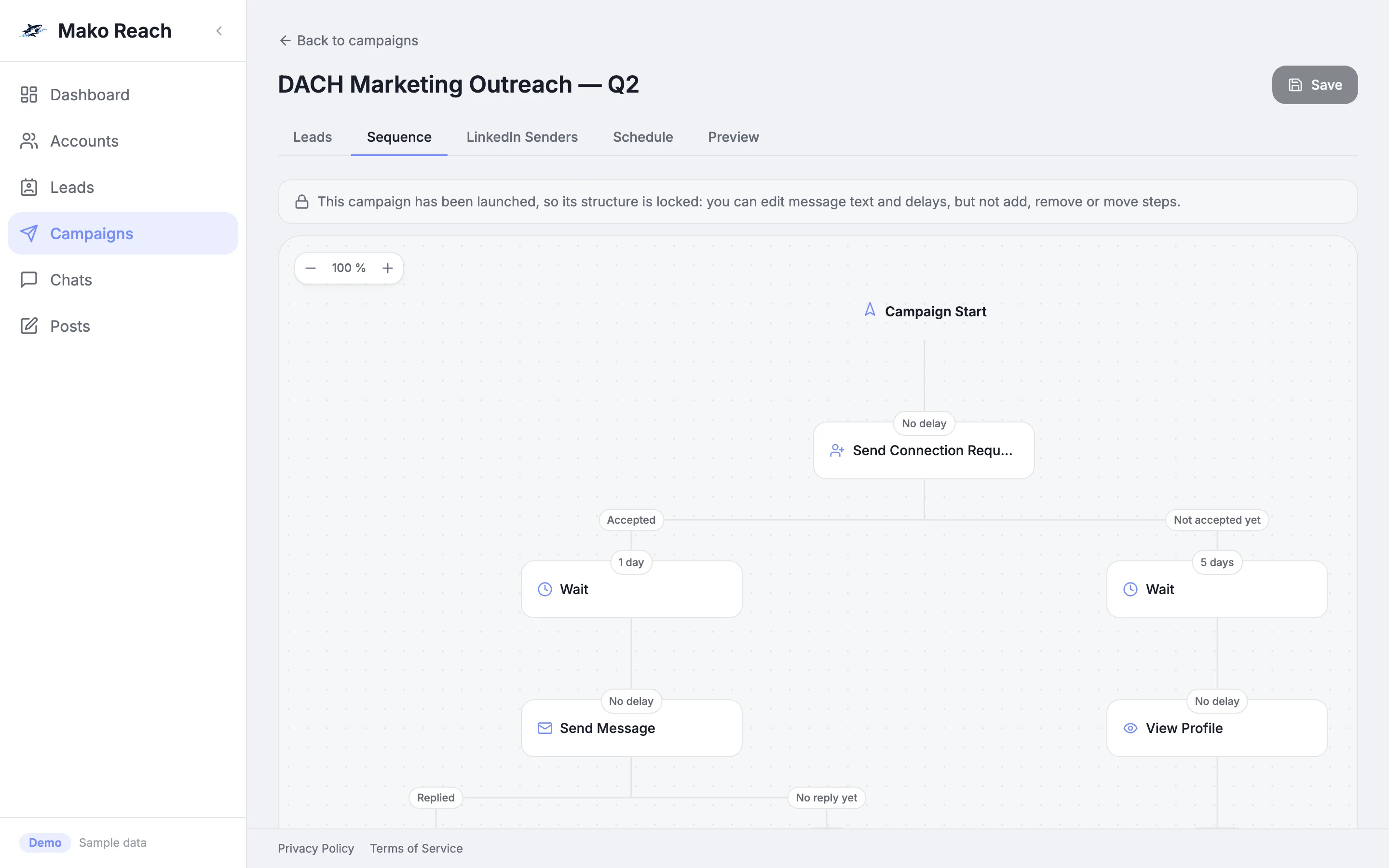
Add steps on a canvas, split the flow on whether an invite was accepted and set the waits between steps. Senders and working hours are set per campaign.
One fixed list of messages treats everyone alike
The lead who accepted your invite and the one who has not get the same follow-up on the same day. Changing the plan means rebuilding the list.
A flow that branches on what happens
Each step can split the path: invite accepted or not yet, replied or no reply yet, connected or not. You decide what comes next on every branch and how long it waits.
How it works
Add steps
Choose from 10 step types: connection request, message, InMail, view profile, follow, like post, find email, two conditions and a wait.
Branch the flow
A connection request splits into Accepted and Not accepted yet. Messages split into Replied and No reply yet. Add an If connection or If open profile check anywhere.
Pick senders and a schedule
Choose the LinkedIn accounts that send for the campaign. Set working days and hours, a time zone and optional start and end dates.
Launch and adjust
Launch once every branch ends. After launch you can still edit message text and delays, but the steps themselves are locked.
What it does
10 LinkedIn step types
Connection request, message, InMail, view profile, follow, like post, find email, If connection, If open profile and wait.
Branches on outcomes
Accepted or not accepted yet, replied or no reply yet, connected or not connected, open profile or not.
Waits you set
Put a wait between steps and set the delay on each step, from minutes up to a year.
Working hours and time zone
Choose the days, the hours and the time zone in which the campaign sends, with optional start and end dates.
Several senders per campaign
The engine rotates across the selected accounts to spread daily volume. A lead keeps the sender that first contacted it, so follow-ups come from the same person.
Checked before launch
Messages and InMails must follow a confirmed connection and have text, and every branch must end. The builder checks this before the campaign can go live.
Open a campaign and add a step
- Open the first campaign and click Edit Campaign.
- On the Sequence tab, click Add action at the end of the accepted path.
- Choose Send Message and write a short text.
Sample data, nothing is sent, no sign-up. The demo screens are in English.
Questions
What steps can a sequence contain?
Ten: connection request, message, InMail, view profile, follow, like post, find email, If connection, If open profile and wait. Every branch ends with an End step.
Can I change a campaign after it has started?
You can edit message text and delays. Adding, removing or moving steps is locked after launch, so create a new campaign for a new structure.
Can several LinkedIn accounts send for one campaign?
Yes. Select the accounts in the campaign. The engine rotates across them, and each lead stays with the account that first contacted it.
Can I control when it sends?
Yes. Set the days, the hours and the time zone, and optionally a start and an end date.